GNU Privacy guard
GNU Privacy Guard (GPG/PGP) use for encrypting messages by using PKI or asymmetric key.

Asymmetric key mechanism uses public and private key
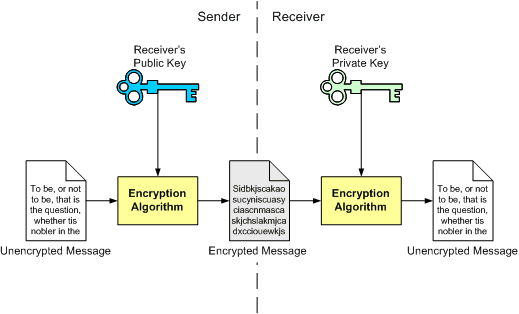
- sender side:
- receiver side:
- Owner of the keys can exchange public key with others , and then they send back encrypted messages again to the owner (message encrypt by public key and decrypt by private key), and as usual private key must be secured well.
- GPG is CLI program (command line interface) and there are GUI program such as Seahorse .
- GPG used for encrypt messages ,ASCII files,verification.
- Using GPG
Generate public and private key:
by command gpg --gen-keyresult:
This is free software: you are free to change and redistribute it.
There is NO WARRANTY, to the extent permitted by law.
There is NO WARRANTY, to the extent permitted by law.
Please select what kind of key you want:
(1) RSA and RSA (default)
(2) DSA and Elgamal
(3) DSA (sign only)
(4) RSA (sign only)
Your selection?
(1) RSA and RSA (default)
(2) DSA and Elgamal
(3) DSA (sign only)
(4) RSA (sign only)
Your selection?
now hit enter to specify the default
result:
RSA keys may be between 1024 and 4096 bits long.
What keysize do you want? (2048)
What keysize do you want? (2048)
hit enter again to specify the default
result:
Requested keysize is 2048 bits
Please specify how long the key should be valid.
0 = key does not expire
<n> = key expires in n days
<n>w = key expires in n weeks
<n>m = key expires in n months
<n>y = key expires in n year
Please specify how long the key should be valid.
0 = key does not expire
<n> = key expires in n days
<n>w = key expires in n weeks
<n>m = key expires in n months
<n>y = key expires in n year
you can specify expire date , hit enter to chose key does not expire.
result:
Key does not expire at all
Is this correct? (y/N)
Is this correct? (y/N)
Hit y .
result:
You need a user ID to identify your key; the software constructs the user ID
from the Real Name, Comment and Email Address in this form:
"Heinrich Heine (Der Dichter) <heinrichh@duesseldorf.de>"
from the Real Name, Comment and Email Address in this form:
"Heinrich Heine (Der Dichter) <heinrichh@duesseldorf.de>"
Real name:
Now enter you real name and hit enter , And then
Email address:
Now enter your e-mail addressAnd then hit enter for comment
result:
result:
You selected this USER-ID:
"example <example@example.com>"
Change (N)ame, (C)omment, (E)mail or (O)kay/(Q)uit?
"example <example@example.com>"
Change (N)ame, (C)omment, (E)mail or (O)kay/(Q)uit?
Enter o to continue or (N , C , E ) to change your data
You need a Passphrase to protect your secret key.
Enter passphrase:
Enter passphrase:
if you wan to to use a password for your keys (if you wan to, ,just enter the password and then . if you don't just hit enter).
Repeat passphrase:
repeat the password or hit enter again
We need to generate a lot of random bytes. It is a good idea to perform
some other action (type on the keyboard, move the mouse, utilize the
disks) during the prime generation; this gives the random number
generator a better chance to gain enough entropy.
some other action (type on the keyboard, move the mouse, utilize the
disks) during the prime generation; this gives the random number
generator a better chance to gain enough entropy.
and GNU start to generate keys , (hit random keys and move mouse to improve generating public and private key ).
let's navigate GPG file
cd ~/.gnupg/
there are two important filessecring.gpg ---> private key
pubring.gpg ---> public key
And now you can exchange your public key (pubring.gpg) with others to send you encrypted messages...
to see your keys use command gpg --list-key
result:
pub 2048R/55728FBB 2010-11-20
uid example <example@example.com>
sub 2048R/5A5F62F0 2010-11-20
uid example <example@example.com>
sub 2048R/5A5F62F0 2010-11-20
55728FBB ID of public key ,ID is a unique and use to specify the recipient or the owner of private key that match public key.